What Is FLUX Schnell? A Fast AI Model for Lifelike, Hyper-Realistic Images
High-speed generation meets photographic quality. Dive into our complete guide to FLUX Schnell in Render FX. Featuring natural-language prompting tips, pros and cons, and system requirements to get started locally today.
What Is FLUX Schnell? A Fast AI Model for Lifelike, Hyper-Realistic Images
Some AI image models are built for maximum control. Others are built for broad stylistic range. FLUX Schnell is built for speed, giving creators a fast way to generate polished images locally while still producing strong detail and visual quality.
That is one of the reasons Distinct AI gives creators access to multiple local AI models instead of locking everything behind one system. Different creative jobs call for different tools, and with Distinct AI, you can choose the model that fits the result you want.
FLUX Schnell, officially FLUX.1 [schnell], is developed by Black Forest Labs. It is the fastest model in the FLUX.1 family and is designed for rapid local image generation, making it especially useful when you want to explore realistic visual ideas quickly.
Local Image Generation With a Photographic Feel
FLUX.1 is a family of text-to-image models developed by Black Forest Labs. The company describes the family as being built around strong image detail, prompt adherence, style diversity, and complex scene generation.
Within that family, FLUX Schnell is the fastest local option. It is a few-step model designed for rapid generation, making it especially useful for experimentation and creative workflows where turnaround time matters.
Inside Render FX, this model is particularly effective for realistic creative work. It can produce polished photographic imagery quickly, making it useful for creators who want to test ideas, compositions, lighting, and visual concepts while maintaining a believable, lifelike look.
The Visual Style of FLUX Schnell
In the examples below, FLUX Schnell shows a strong ability to create realistic portraits, photographic scenes, cinematic environments, and polished hyper-realistic imagery.
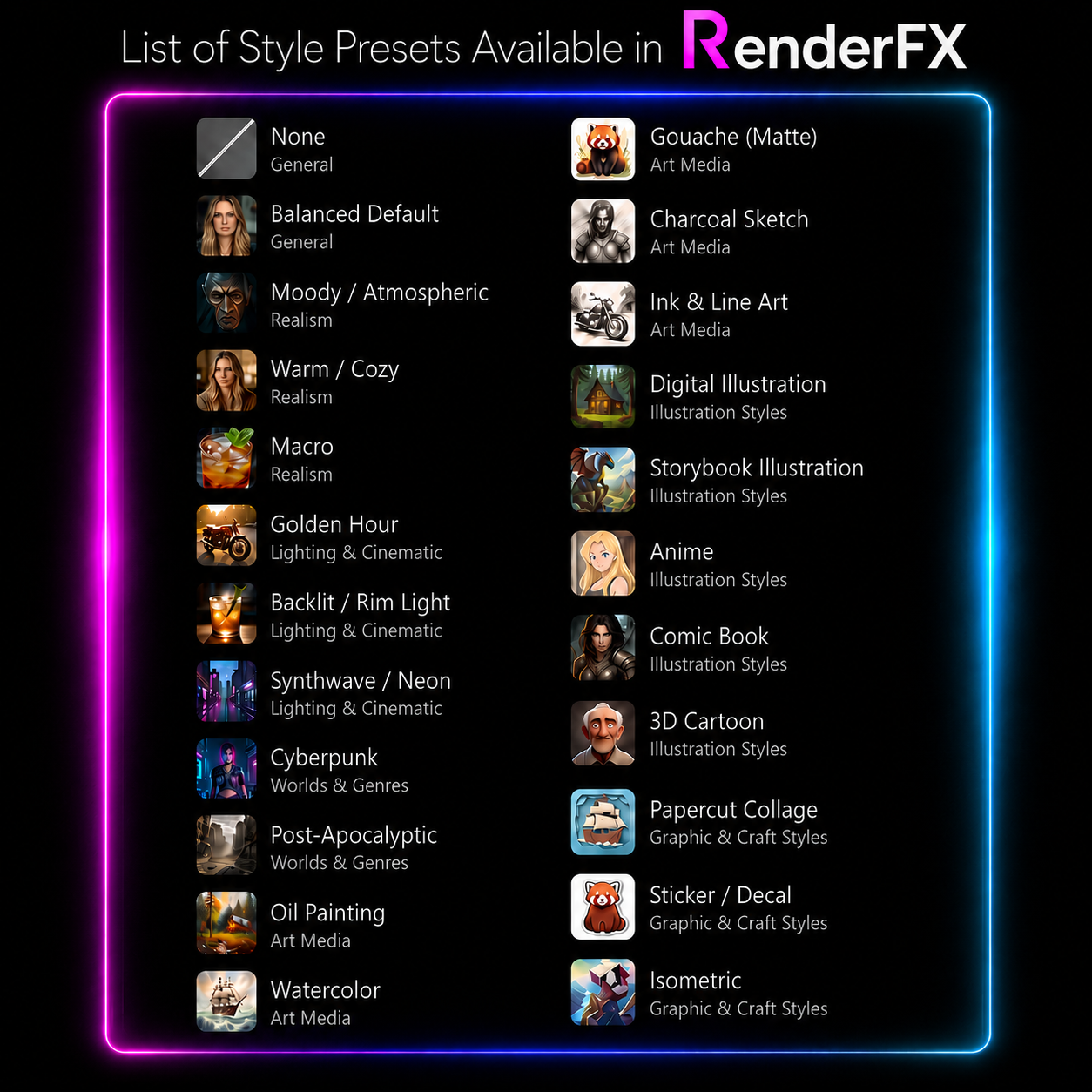
Inside Render FX, the 20-plus stylistic presets available in the software can push that realistic foundation toward more specific looks, including cinematic photography, dramatic portraiture, stylized realism, illustration, and other creative treatments while preserving the model’s strong detail and natural-looking light.
Examples of image output using Flux Schnell and Render FX
Render FX Preset List
List of Presets in Distinct AI local AI application suite
Best Use Cases for FLUX Schnell
FLUX Schnell is particularly well suited for:
Rapid concept development and visual brainstorming
Realistic portraits with natural-looking light
Cinematic scenes and photographic environments
Hyper-realistic marketing and social media visuals
Testing compositions, moods, and lighting quickly
Everyday local AI image generation when speed is a priority
If you want to create polished, realistic images quickly and keep experimenting without slowing down your workflow, FLUX Schnell is a strong model to use inside Render FX.
How to Prompt With FLUX Schnell
FLUX Schnell works well with clear natural-language prompts that describe the image you want rather than relying on long strings of disconnected keywords. Black Forest Labs recommends putting the main subject first, then adding useful details about the setting, lighting, composition, style, and mood.
Example Prompt:
“Close-up outdoor portrait of a young woman with brown hair blowing in the wind, warm natural sunlight, realistic skin detail, soft mountain background, shallow depth of field, and cinematic photography.”
Photo realistic example from Render FX using FLUX Schnell
FLUX does not use conventional negative prompts. Instead of listing what you do not want, describe the positive visual alternative you want the model to create. For example, rather than writing “no people in the background,” describe “an empty shoreline” or “a quiet, isolated harbour.”
Start with a simple prompt, review the result, and then adjust one important element at a time. Refine the subject, framing, lighting, or style before rewriting the entire prompt.
Pros and Cons of FLUX Schnell
Pros:
Fast local image generation
Strong realistic and photographic output
Lifelike detail and natural-looking light
Useful for rapid experimentation and iteration
Openly available under the Apache 2.0 licence
Cons:
Prompt following can vary depending on how the prompt is written
Highly precise or complex scenes may require several attempts
Results may not always match the requested composition exactly
Like other generative models, it can reflect biases present in its training data
A slower or more specialized model may be preferable when maximum precision is more important than speed
Improving FLUX Schnell Results
Text Guidance can have a noticeable effect on FLUX Schnell results. Lowering it may produce a more natural, less intense image, while increasing it can help the model follow a detailed prompt more closely.
If an unwanted detail appears, revise the prompt using a clearer positive description of the result you want.
FLUX Schnell System Requirements
FLUX Schnell supports several hardware and model configurations which the Distinct AI's suite can leaverage. Each configuration has different system memory, video memory, and storage requirements. The specifications below represent separate ways of running the model rather than a progression from minimum to recommended.
CPU-based configurations rely primarily on system memory. NVIDIA and AMD GPU configurations use dedicated video memory to handle more of the workload, while compatible Intel graphics configurations rely more heavily on shared system memory.
CPU-Based Generation
Optimized INT8 Model
For CPU-based generation using the optimized INT8 model:
Processor: Intel 11th Gen Core processor or newer with INT8 support
System memory: 64 GB RAM
Free disk space: 15.7 GB
Graphics: Integrated graphics supported; no dedicated GPU required
OpenVINO FP16 Model
The OpenVINO FP16 model variant can run on compatible Intel and AMD processors:
System memory: 64 GB RAM
Free disk space: 15.9 GB
Graphics: No dedicated GPU required
GPU-Based Generation
Compatible GPU configurations will generally generate images faster than CPU-based configurations. Requirements vary by graphics platform.
NVIDIA GPU
Graphics: NVIDIA GeForce RTX 20 Series or newer
Video memory: 6 GB VRAM or more
System memory: 48 GB RAM
Free disk space: 31.4 GB
AMD GPU
Graphics: AMD Radeon RX 6000 Series or newer
Video memory: 48 GB VRAM
System memory: 16 GB RAM
Free disk space: 25.1 GB
Intel Graphics
Graphics: Intel Arc graphics or Intel Iris Xe graphics
System memory: 64 GB RAM
Free disk space: 15.9 GB
Final Thoughts
FLUX Schnell is a strong choice for creators who want fast local image generation with a realistic, photographic look.
Ready to try FLUX Schnell? Use it inside Render FX to create fast, private AI-generated images directly on your own desktop.