What Is SDXL Turbo? A Fast Local AI Model for Rapid Prototyping and Concept Development
SDXL Turbo is a fast local AI image model built for rapid prototyping and concept development. See what it does best, how to prompt it, and what hardware it needs.
What Is SDXL Turbo? A Fast Local AI Model for Rapid Prototyping and Concept Development
AI image generation is powered by models. Each model has its own strengths and creative personality. Some are better for realism, some are better for illustration, and some are built to move quickly through ideas.
That is one of the reasons Distinct AI gives creators access to multiple local AI models instead of locking everything behind one system. If you use a tool like Midjourney, you are mostly relying on one model experience. With Distinct AI, you can choose the model that fits the job.
SDXL Turbo is one of those choices. Developed by Stability AI, it is a faster, distilled version of Stable Diffusion XL designed for near-instant image generation. More than anything, SDXL Turbo is built to help creators quickly prototype, conceptualize, and explore visual ideas.
Built for Rapid Creative Experimentation
Stable Diffusion XL, or SDXL, is part of Stability AI’s wider Stable Diffusion family of text-to-image models. The original SDXL model was designed to create high-quality images across a broad range of subjects and visual styles.
SDXL Turbo takes that foundation and significantly reduces the number of generation steps required to create an image. This makes it especially useful for rapid experimentation and creative workflows where speed matters more than spending extra time refining every individual result.
Inside Render FX, SDXL Turbo helps creators move quickly from an initial idea to a visual concept. You can test compositions, characters, environments, colour palettes, lighting, and artistic styles before deciding which ideas are worth developing further.
The Visual Style of SDXL Turbo
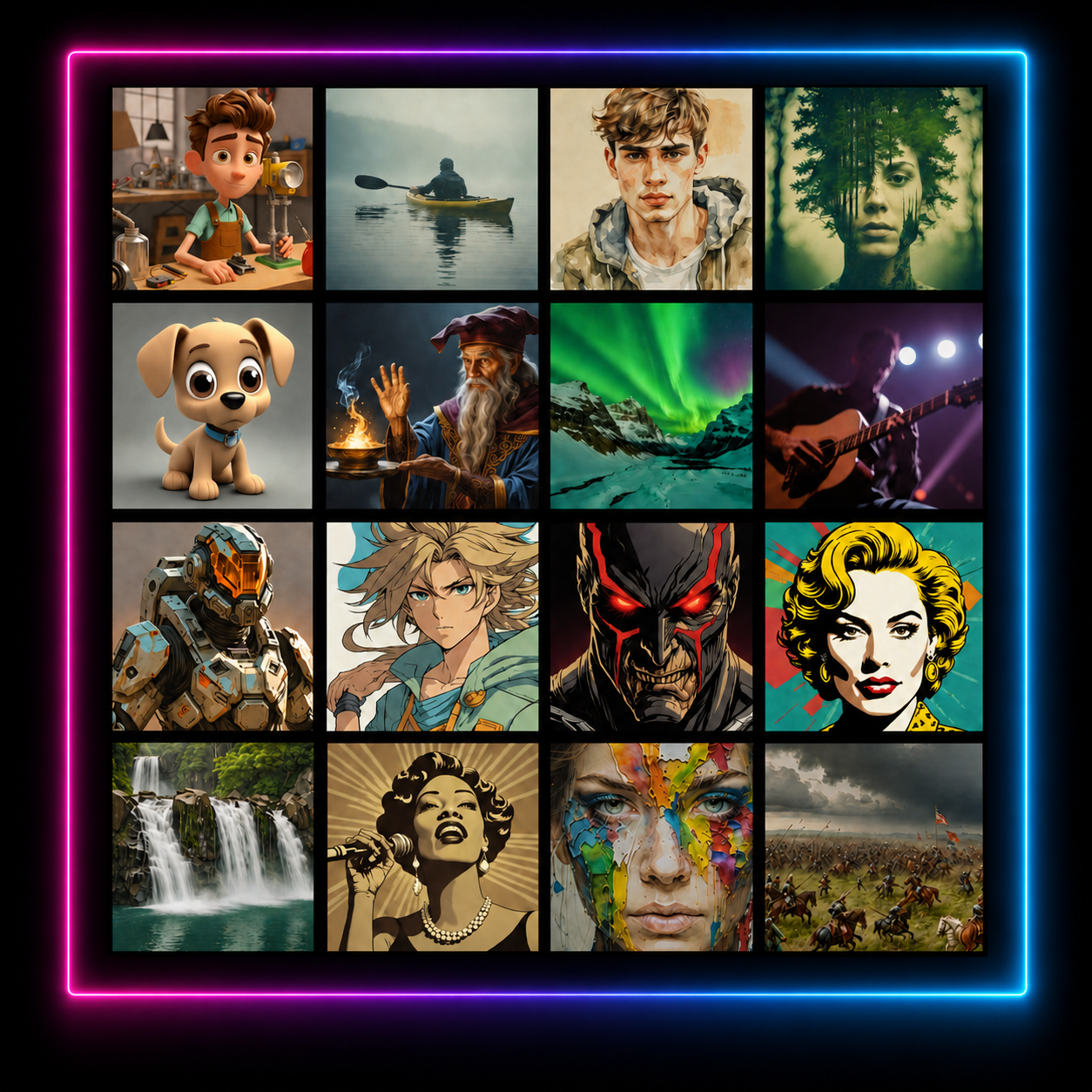
In the examples below, SDXL Turbo demonstrates a broad visual range, including animated characters, photographic scenes, fantasy imagery, anime, concept art, pop art, landscapes, and cinematic environments.
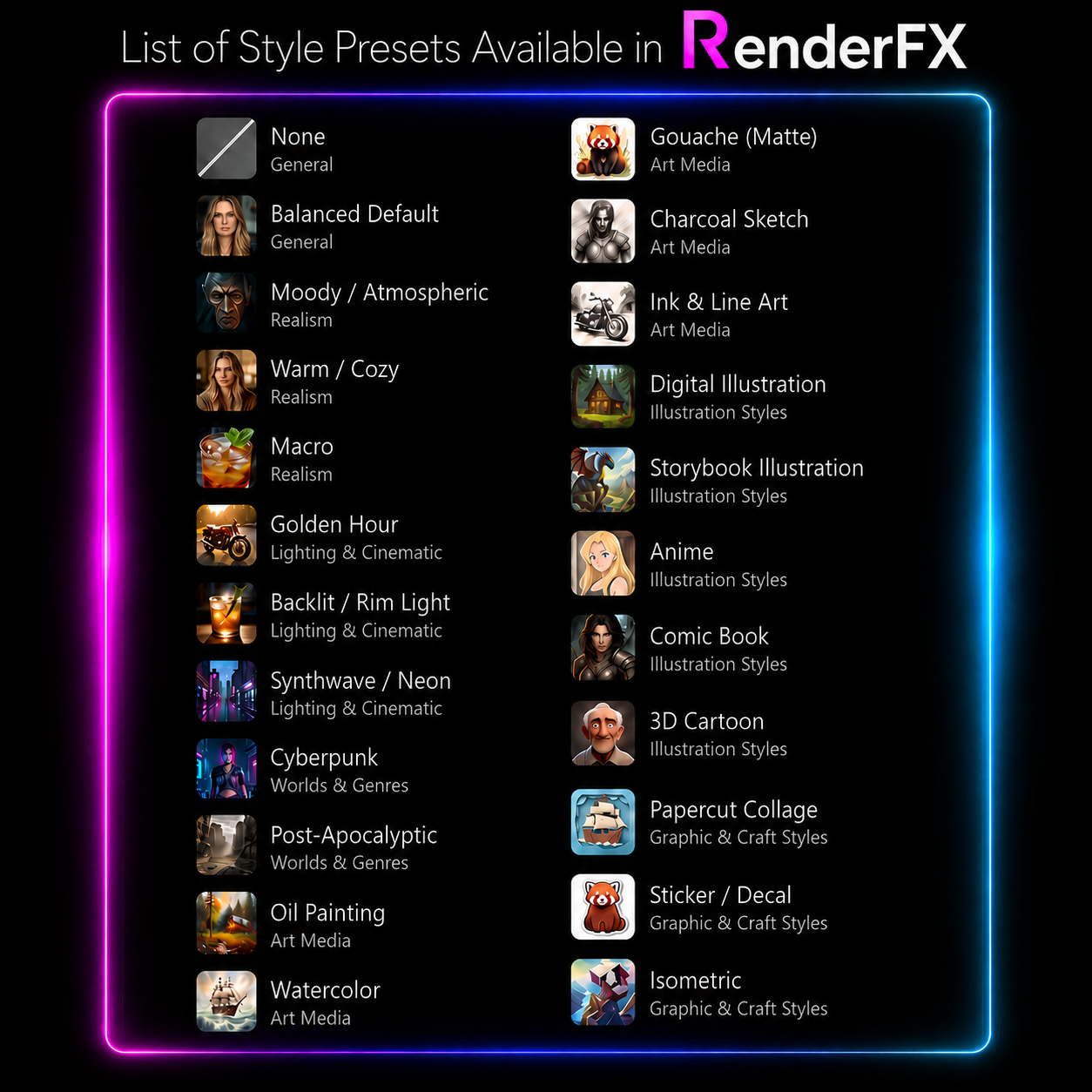
Inside Render FX, the 20-plus stylistic presets available in the software can push that versatility toward more specific looks. This makes it easy to rapidly compare different aesthetics, visual treatments, lighting styles, and creative approaches while developing an idea.
Render FX Preset List
Best Use Cases for SDXL Turbo
SDXL Turbo is particularly well suited for:
Rapid prototyping and early-stage concept development
Visual brainstorming and creative experimentation
Quickly testing characters, environments, and compositions
Exploring different colour palettes, lighting, and moods
Producing rough concept art and storyboards
Comparing several visual approaches before choosing a direction
Everyday local AI image generation when speed is the priority
If you want to move from an idea to a visual concept quickly, SDXL Turbo is a strong model to use inside Render FX.
How to Prompt With SDXL Turbo
SDXL Turbo works best with clear, focused prompts that communicate the central idea quickly. Because the model is designed for one-step or few-step generation, it is especially useful for testing concise concepts and then refining the strongest results.
Start with the main subject or scene, then add the most important details about the setting, composition, lighting, style, and mood.
For example:
Prompt:
“Massive moon rising over a dark alien ocean, a small sailboat on the water, moonlight reflecting across the waves, misty horizon, cinematic atmosphere, highly detailed digital art.”
SDXL Turbo does not use conventional negative prompts in its official implementation, and both negative prompting and guidance scale are disabled for the model. Instead, describe the result you want directly and keep the prompt centred on the most important visual details.
Start with a simple concept, generate several fast variations, and then adjust one element at a time, such as the composition, lighting, colour palette, or artistic style.
Pros and Cons of SDXL Turbo
Pros:
Extremely fast local image generation
Well suited for rapid prototyping and concept development
Useful for testing many ideas in a short amount of time
Broad visual range across photographic and illustrated styles
Strong option for brainstorming, storyboarding, and early creative exploration
Requires only a small number of generation steps
Cons:
Fine details may be less refined than with slower, more advanced models
Complex scenes and precise compositions may require several attempts
Results may not always follow highly detailed prompts exactly
Negative prompts and guidance scale are not used in the model’s official implementation
A different model may be preferable when maximum detail and final-image precision matter more than speed
Improving SDXL Turbo Results
SDXL Turbo generally works best when prompts stay clear and focused. Lead with the central idea, then include only the most important details about the composition, lighting, setting, and style.
Because the model generates so quickly, create several variations and compare the results. Adjust one element at a time and build on the version that comes closest to your concept.
SDXL Turbo System Requirements
SDXL Turbo can run using either a supported CPU or a compatible GPU. The requirements differ because CPU-based generation relies more heavily on system RAM, while NVIDIA and AMD GPU configurations use dedicated video memory. Compatible Intel graphics configurations rely more heavily on shared system memory.
CPU-Based Generation
Optimized INT8 Model
For CPU-based generation using the optimized INT8 model:
Processor: Intel 11th Gen Core processor or newer with INT8 support
System memory: 16 GB RAM
Free disk space: 3.3 GB
Graphics: Integrated graphics supported; no dedicated GPU required
OpenVINO FP16 Model
The OpenVINO FP16 model variant can run on compatible Intel and AMD processors:
System memory: 24 GB RAM
Free disk space: 4.1 GB
Graphics: No dedicated GPU required
GPU-Based Generation
Compatible GPU configurations will generally provide faster image generation than CPU-based configurations. Requirements vary by graphics platform.
NVIDIA GPU
Graphics: NVIDIA GeForce RTX 20 Series or newer
Video memory: 6 GB VRAM or more
System memory: 16 GB RAM
Free disk space: 6.5 GB
AMD GPU
Graphics: AMD Radeon RX 6000 Series or newer
Video memory: 12 GB VRAM
System memory: 16 GB RAM
Free disk space: 5.6 GB
Intel Graphics
Graphics: Intel Arc graphics or Intel Iris Xe graphics
System memory: 24 GB RAM
Free disk space: 4.1 GB
Final Thoughts
SDXL Turbo is a strong choice for creators who want to move quickly from an initial idea to a visual concept. Its speed makes it especially useful for prototyping, brainstorming, and testing creative possibilities inside Render FX.
Ready to try SDXL Turbo? Use it inside Render FX to generate fast, private AI images directly on your own desktop.